Opportunities
In short. An opportunity is a deal on a lead: a value, a close date, a confidence percentage and a stage in your pipeline. You move it across the board until it is Won or Lost, and the forecast adds it all up.
Who it is for. Reps, every time a conversation turns into a possible sale. Managers, for the weighted pipeline and the deals at risk. Admins, to shape the pipeline stages.
- Where it lives
- Opens from a record or another screen
- Plans
- SoloEssentialsGrowthScaleEvery plan
- Permission
- Opportunities
What it does
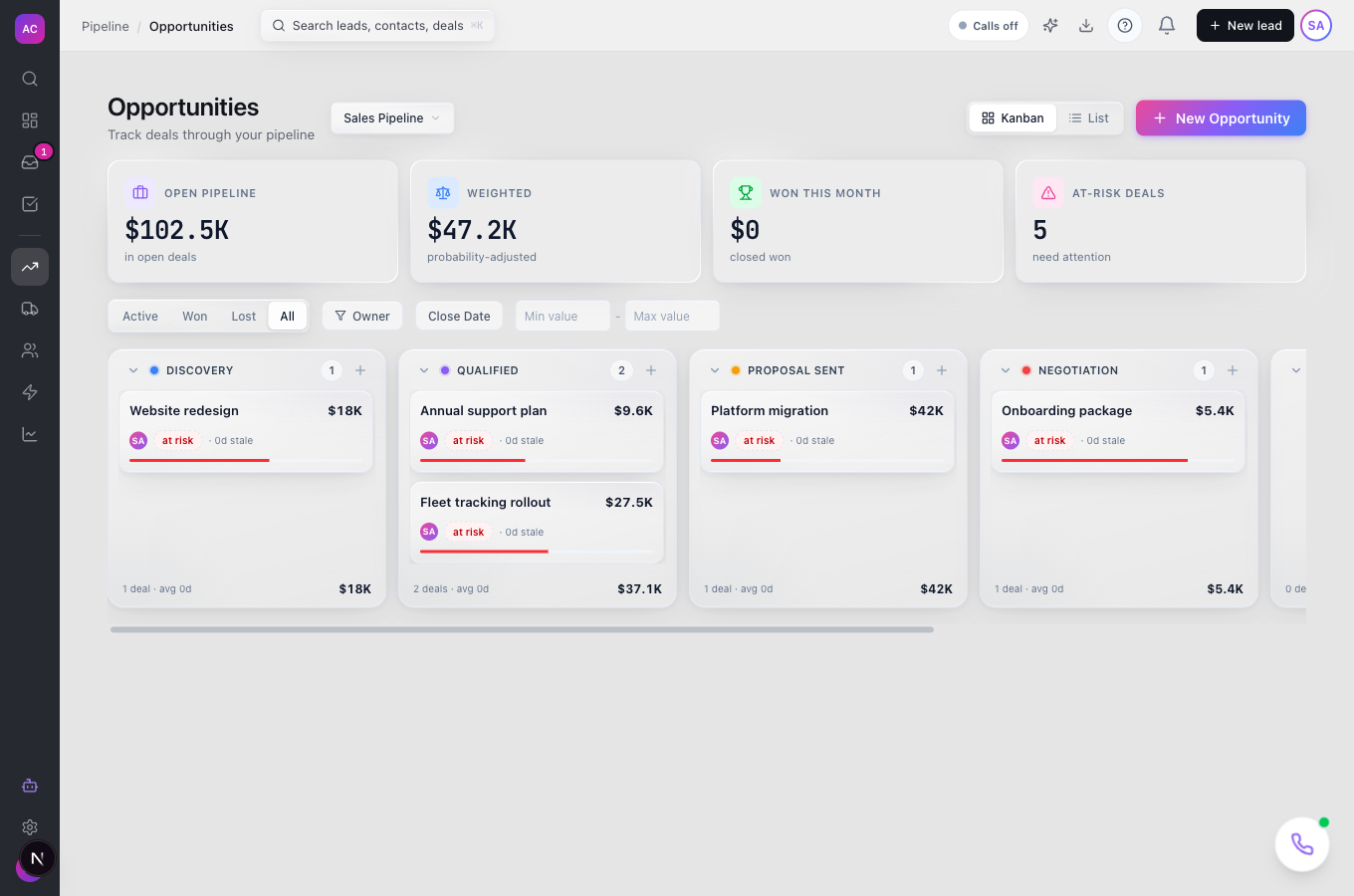
Section titled “What it does”- Shows a pipeline board, one column per stage, with cards you drag from stage to stage. Switch to a list with the List view toggle.
- Summarises the pipeline at the top: Open pipeline, Weighted (adjusted by confidence), Won this month and At-risk deals.
- Filters by Active, Won, Lost or All, by close date (This Month, This Quarter or a custom range), by owner and by value, and flags stalled deals with no activity for 14 days.
- Opens a drawer on any card with Details, Deal Health (At risk, Watch or Healthy, with a suggested next step) and Lead Info, plus a note box.
- Captures why you won or lost. Marking a deal Won or Lost opens a short wizard: up to three reasons, the competitor involved, the deciding factor and notes.
- Supports more than one pipeline on Essentials and above, each with its own stages.
- Feeds the Forecast tab in Reporting, sorting deals into commit, best case and pipeline by their confidence.
What it does not do
Section titled “What it does not do”- It does not set a probability per stage. Confidence belongs to each deal, starting at 50, and you change it as the deal moves.
- It does not show custom fields on the deal yet. You can define opportunity custom fields in Settings, but the create dialog and the drawer do not display them.
- It does not save views. Filters live in the page URL, so bookmark a filtered page instead.
- It does not let you move a Won or Lost deal back to an active stage from the board. Create a new opportunity if the deal reopens.
Set it up
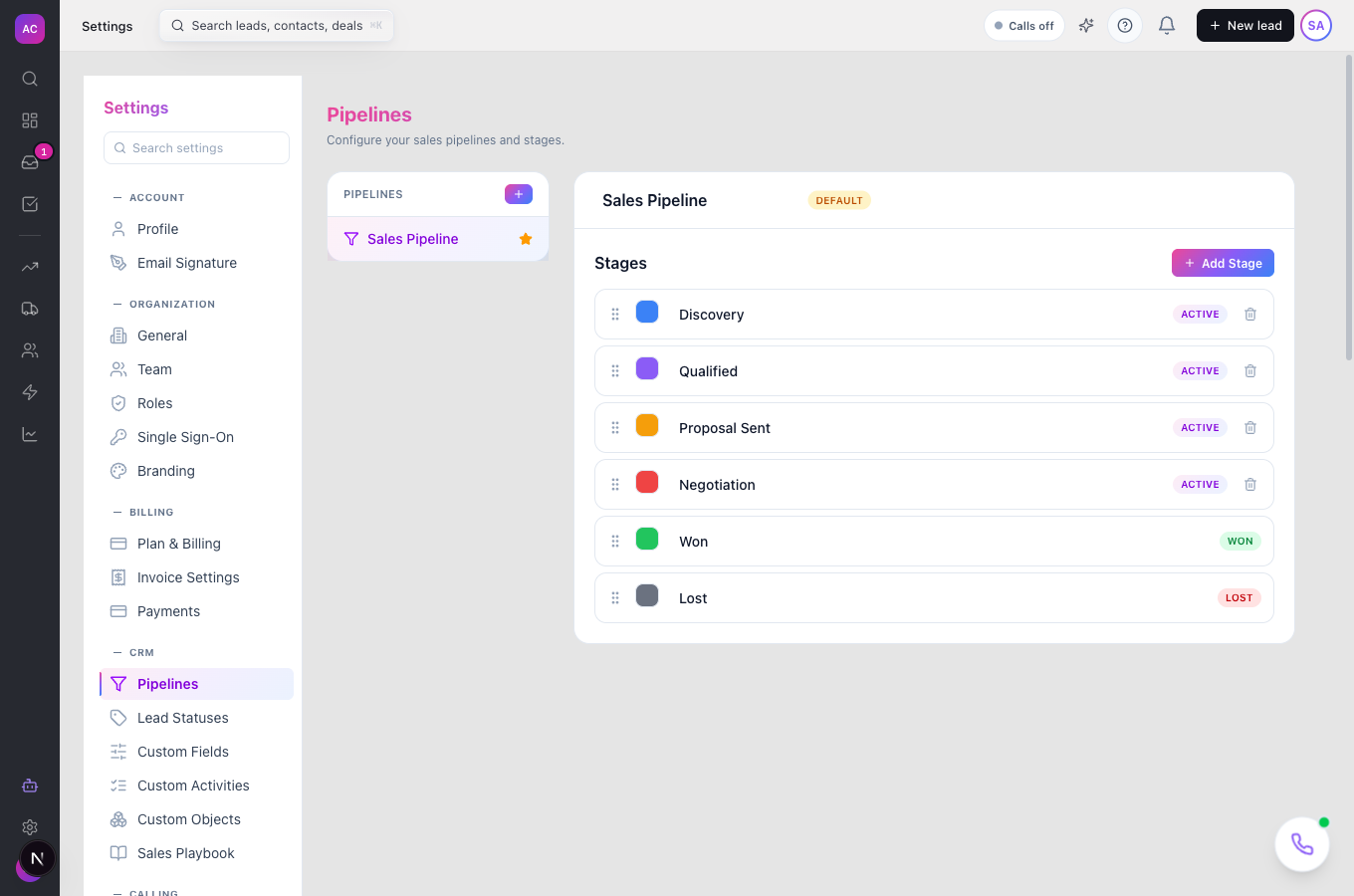
Section titled “Set it up”- Open Settings → Pipelines. Your first pipeline comes with Discovery, Qualified, Proposal Sent, Negotiation, Won and Lost.
- Rename the pipeline by editing its name. Click Add Stage to add one, drag to reorder, Change color to recolour, and the trash icon to delete an unused stage. Won and Lost stages cannot be deleted.
- On Essentials, Growth or Scale, click + next to Pipelines to add another pipeline, and mark one as Default pipeline.
Stage types (Active, Won, Lost) are fixed when a stage is created.
On mobile the board scrolls sideways one column at a time; the list view is desktop only.
Use it day to day
Section titled “Use it day to day”- Create a deal. Click New Opportunity, or the + on a stage column to start it there. Pick the lead, keep or change the suggested name, set pipeline, stage, value, currency, confidence, close date and owner, then Create Opportunity. From a lead page, use Create opportunity in the top bar or the Opportunities section.
- Move it along. Drag the card to the next column, or open the drawer and change Stage. If the move hides the card because of your current filter, a toast tells you and offers View.
- Close it. Drop the card on the Won column and confirm Mark as Won, or drop it on Lost and type the reason. Then answer the win/loss wizard, or Skip.
- Keep notes. Open the drawer, type in Add a note… and click Save Note. Notes land on the lead’s timeline too.
- Spot trouble. Use the Stalled: no activity in 14+ days chip or look for the At risk badge; hover it to see why.
Rules and limits
Section titled “Rules and limits”| Rule | Value |
|---|---|
| Default confidence | 50 percent; forecast counts 80 and above as commit, 50 to 79 as best case |
| Stalled or at risk | no lead activity for 14 days, or close date passed |
| Deals loaded per board or list | up to 100; use filters to narrow |
| Reasons per win or loss | up to 3 |
| Lost reason | required, up to 1,000 characters |
| Opportunity name | up to 300 characters |
| Pipelines | one on Solo; several on Essentials, Growth and Scale |
| Deleting a pipeline | blocked while it has opportunities or is the only pipeline |
| Currencies | USD, EUR, GBP, INR, AUD, CAD |
Troubleshooting and FAQ
Section titled “Troubleshooting and FAQ”The board says “No pipeline selected”. Pick one in the pipeline picker at the top, or ask an admin to mark a default pipeline in Settings.
My Won deal disappeared. You are on the Active filter. Click Won or All to see it.
I cannot drag a deal out of Lost. By design. If the deal is back on, create a new opportunity on the same lead; the lost one stays as history.
The “+” for a new pipeline is disabled. Multiple pipelines need Essentials or above. The tooltip says so.
Who can edit deals? Anyone with the Leads edit capability, since opportunities follow their lead’s permissions. Deleting needs the Leads delete capability. Pipeline settings need the settings permission.