Sales goals
In short. A goal is a target for a period, such as 20 calls a week or 50,000 in won revenue this quarter. Pitch2Sale counts progress as calls are logged and deals are won.
Who it is for. Managers who set targets for their reps, and reps who want to see how far they are from theirs.
- Where it lives
- Opens from a record or another screen
- Plans
- SoloEssentialsGrowthScale
- Permission
- Goals
What it does
Section titled “What it does”- Tracks eight kinds of target: Revenue, Deals won, Deals created, Calls, Emails, Meetings, Activities and Custom.
- Sets a goal for one person (Individual), or for the whole organisation (Org), over a Weekly, Monthly, Quarterly or Yearly period.
- Updates progress on its own: logging a call, email or meeting, creating a deal, or winning one moves the matching goals forward. Refresh on a goal recounts it straight away.
- Labels each goal On track, At risk or Behind by comparing progress with how much of the period has passed, and Completed at 100%.
- Notifies the goal owner at 75% and when the goal is reached.
- Can roll a goal over: tick Auto-create next period (recurring) and a fresh goal with the same target and owner starts when the period ends.
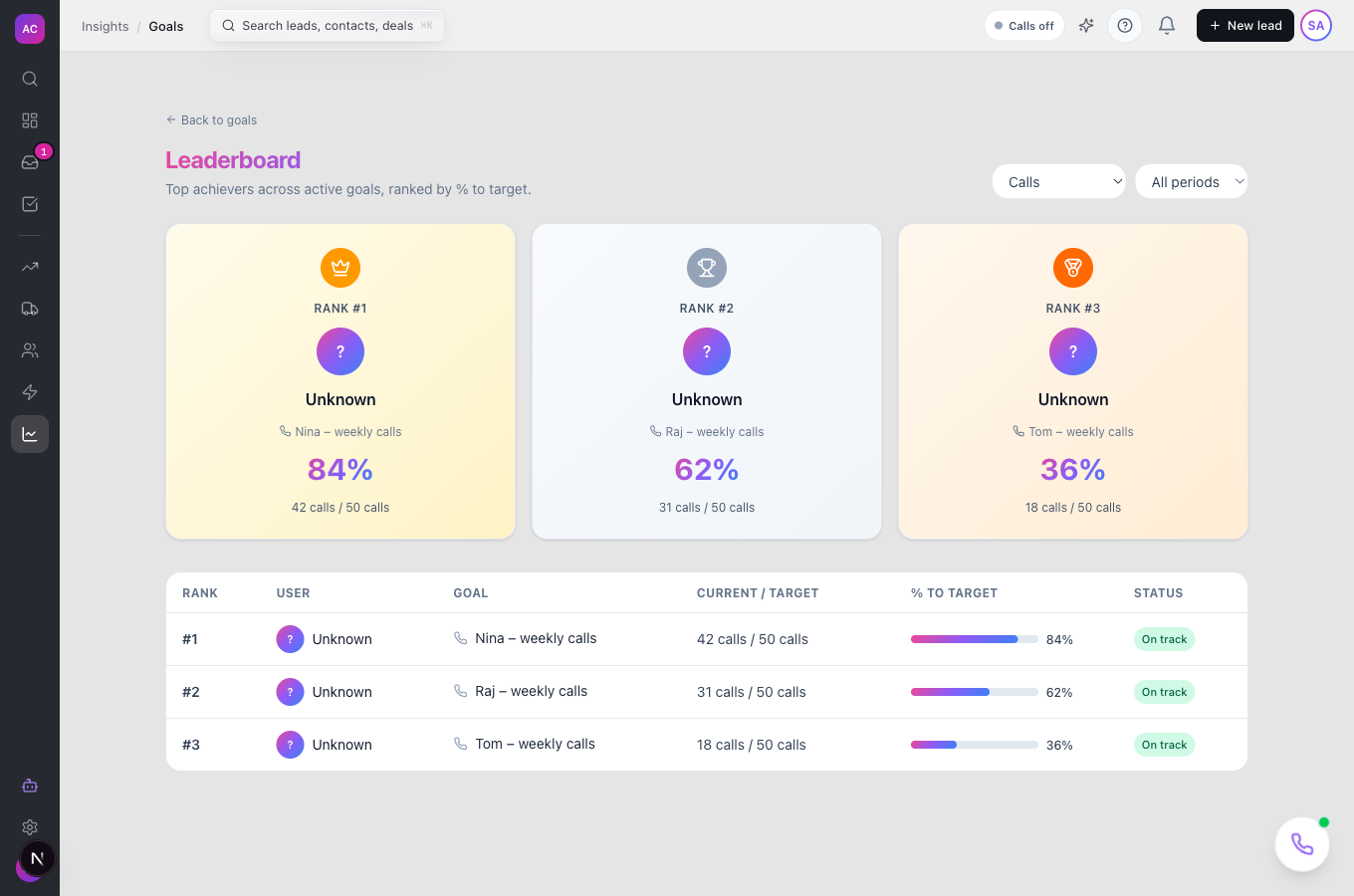
- Ranks active goals on the Leaderboard, filtered by type and period.
What it does not do
Section titled “What it does not do”- It does not count Custom goals. A Custom goal stays at zero because there is no way to enter its progress yet; use one of the other types.
- It does not split a team goal by members yet. A Team goal has one team owner and counts activity across the whole organisation, like an Org goal. Use Individual goals for each rep instead.
- It does not mark goals as Missed by itself yet. A goal whose period ended short of its target keeps its last status.
- It does not support custom date ranges. Periods start on the date you pick and run a week, month, quarter or year.
- It is not on the Solo or Essentials plans, even though the Goals item shows in the sidebar there.
Set it up
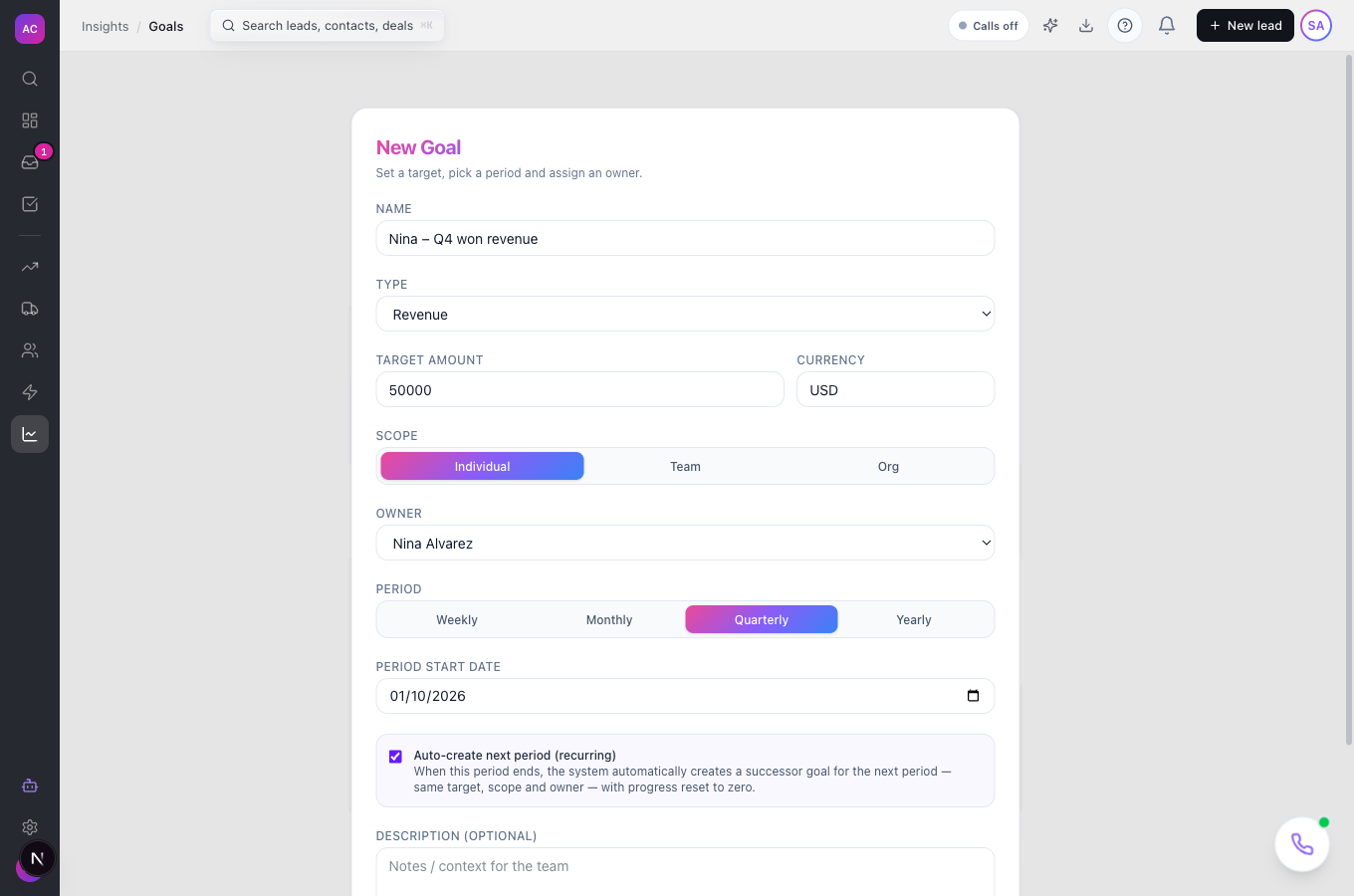
Section titled “Set it up”- Open Goals in the sidebar and click New Goal.
- Enter a Name, for example “Nina Q4 won revenue”.
- Pick a Type, such as Revenue, then enter the Target amount and the Currency. For count types, enter a Target value and a Unit.
- Choose a Scope. For Individual, pick the Owner.
- Pick a Period and the Period start date.
- Tick Auto-create next period (recurring) if this target repeats.
- Add a Description if the team needs context, and click Create goal.
Works the same on mobile.
Use it day to day
Section titled “Use it day to day”Check your progress. Open Goals and click My goals. Each card shows a progress ring. Click a goal to see Target, Current, Remaining, Days left, Projected and Status, the deals or activities that count towards it under Contributing data, and its Update history.
Compare the team. Click Leaderboard. Tom Fischer, the sales manager, picks “Calls” under All types to rank everyone’s call goals by % to target.
Change a target. Open the goal, click Edit, change the target or owner, and click Save changes.
Remove a goal. Open it, click Delete and confirm. This cannot be undone.
Rules and limits
Section titled “Rules and limits”| Rule | Value |
|---|---|
| Plans | Growth, Scale |
| Goal types | Revenue, Deals won, Deals created, Calls, Emails, Meetings, Activities, Custom |
| Periods | Weekly, Monthly, Quarterly, Yearly |
| Name length | 1 to 500 characters |
| Description length | up to 5,000 characters |
| What counts as revenue | the value of opportunities won during the period |
| On track | progress at or ahead of the share of the period that has passed |
| At risk | up to 25 percentage points behind that share |
| Behind | more than 25 percentage points behind |
| Owner notifications | at 75% and at 100% |
| Recurring roll-over | daily at 00:30 UTC, after the period ends |
| Who can create, edit or delete goals | roles with the Goals Create, Edit or Delete permission |
Troubleshooting and FAQ
Section titled “Troubleshooting and FAQ”A goal is not moving. Check that the work belongs to the goal’s owner and falls inside the period. Revenue and Deals won only count deals moved to a Won status during the period. Click Refresh on the goal to recount.
My Custom goal is stuck at zero. Custom goals have no way to record progress yet. Recreate it with a type that matches the work, such as Activities.
A team goal shows far more than my team did. Team goals count the whole organisation for now. Create Individual goals for each member and compare them on the Leaderboard.
The Goals page shows an upgrade error. Goals need the Growth plan or above. See Settings → Plan & Billing.
The Leaderboard is empty. It only ranks active goals that match the type and period filters. Set both to All types and All periods.