Multiple pipelines
In short. A pipeline is the set of stages a deal moves through. With multiple pipelines you keep different kinds of deals apart, for example New Business and Renewals, each on its own board with its own forecast.
Who it is for. Admins who set up how deals are tracked, and reps and managers who switch between boards on the Opportunities page.
- Where it lives
- Opens from a record or another screen
- Plans
- SoloEssentialsGrowthScale
- Permission
- Multiple Pipelines
What it does
Section titled “What it does”- Lets you add more pipelines under Settings → Pipelines, rename them and choose which one is the default.
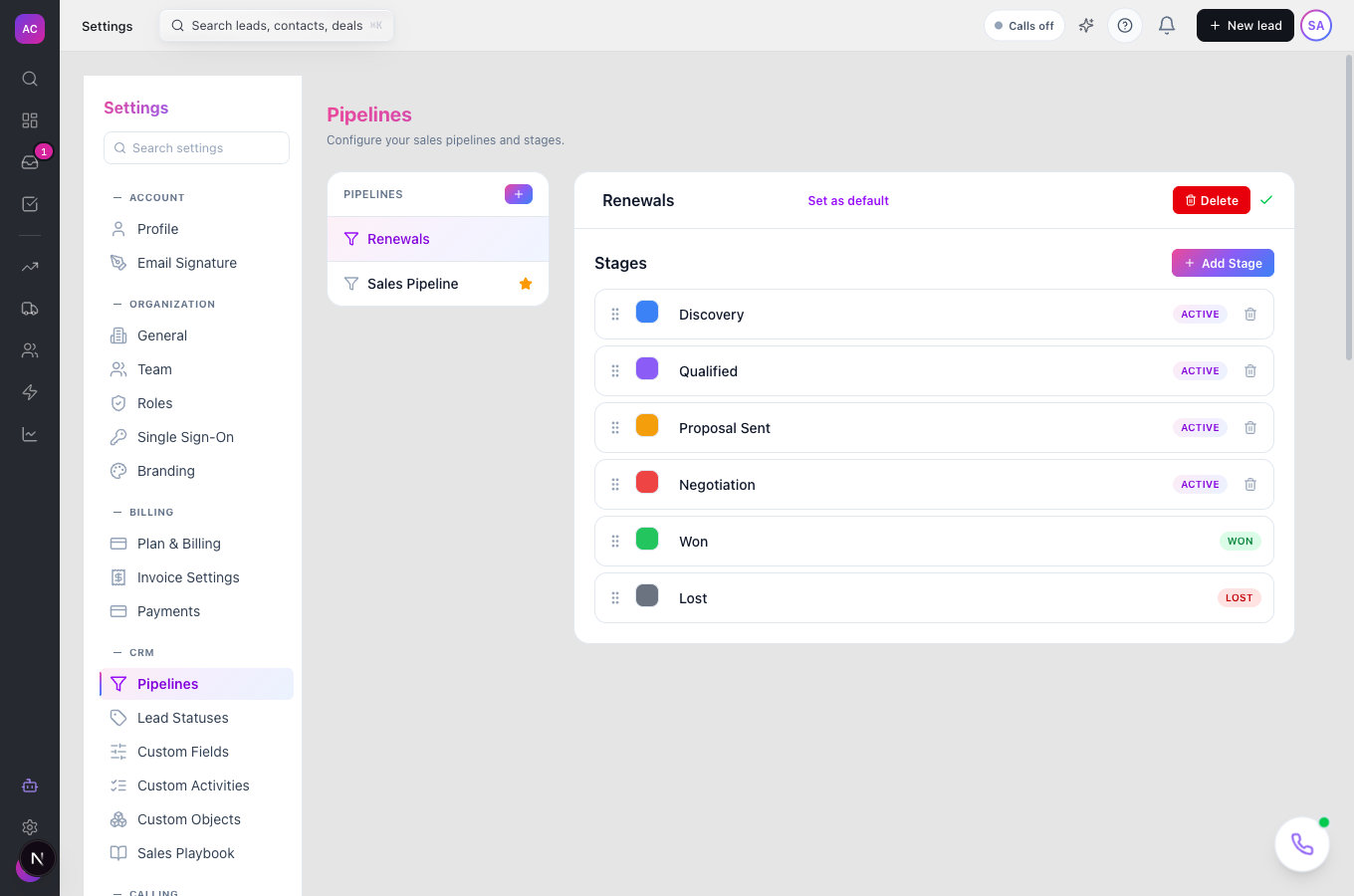
- Gives every new pipeline a ready-made set of stages: Discovery, Qualified, Proposal Sent and Negotiation, then Won and Lost.
- Adds a pipeline picker to the Opportunities page, so each board shows only the deals in that pipeline. The choice is kept in the page link, so you can bookmark or share a board.
- Asks for a Pipeline when you create an opportunity, then offers that pipeline’s stages.
- Converts the lead to a client when a deal reaches the Won stage of any pipeline. See Customers.
What it does not do
Section titled “What it does not do”- It does not save stage changes yet. On Settings → Pipelines you can drag, rename, recolour, add or delete stages, but the changes are gone when you reload. Each pipeline keeps the stages it already has.
- It does not move an opportunity from one pipeline to another. Create the deal in the right pipeline from the start.
- It does not ask before deleting a pipeline. Delete acts at once, although it refuses if any deals are in the pipeline.
- It is not on the Solo plan. Solo has one pipeline; the add button shows “Upgrade to add more pipelines”.
Set it up
Section titled “Set it up”- Open Settings → Pipelines.
- Click the + button next to Pipelines. A pipeline called “New Pipeline” appears, with a “Pipeline created” message.
- Click its name at the top of the right-hand panel, type a new name such as “Renewals”, and press Enter. A “Pipeline name updated” message confirms it.
- To make it the pipeline new deals start in, click Set as default. The Default badge moves to it.
Works the same on mobile.
Use it day to day
Section titled “Use it day to day”Switch boards. Nina Alvarez opens Opportunities and uses the pipeline picker at the top to switch from New Business to Renewals. The board and list now show only renewal deals. Manage Pipelines at the bottom of the picker takes admins to the settings page.
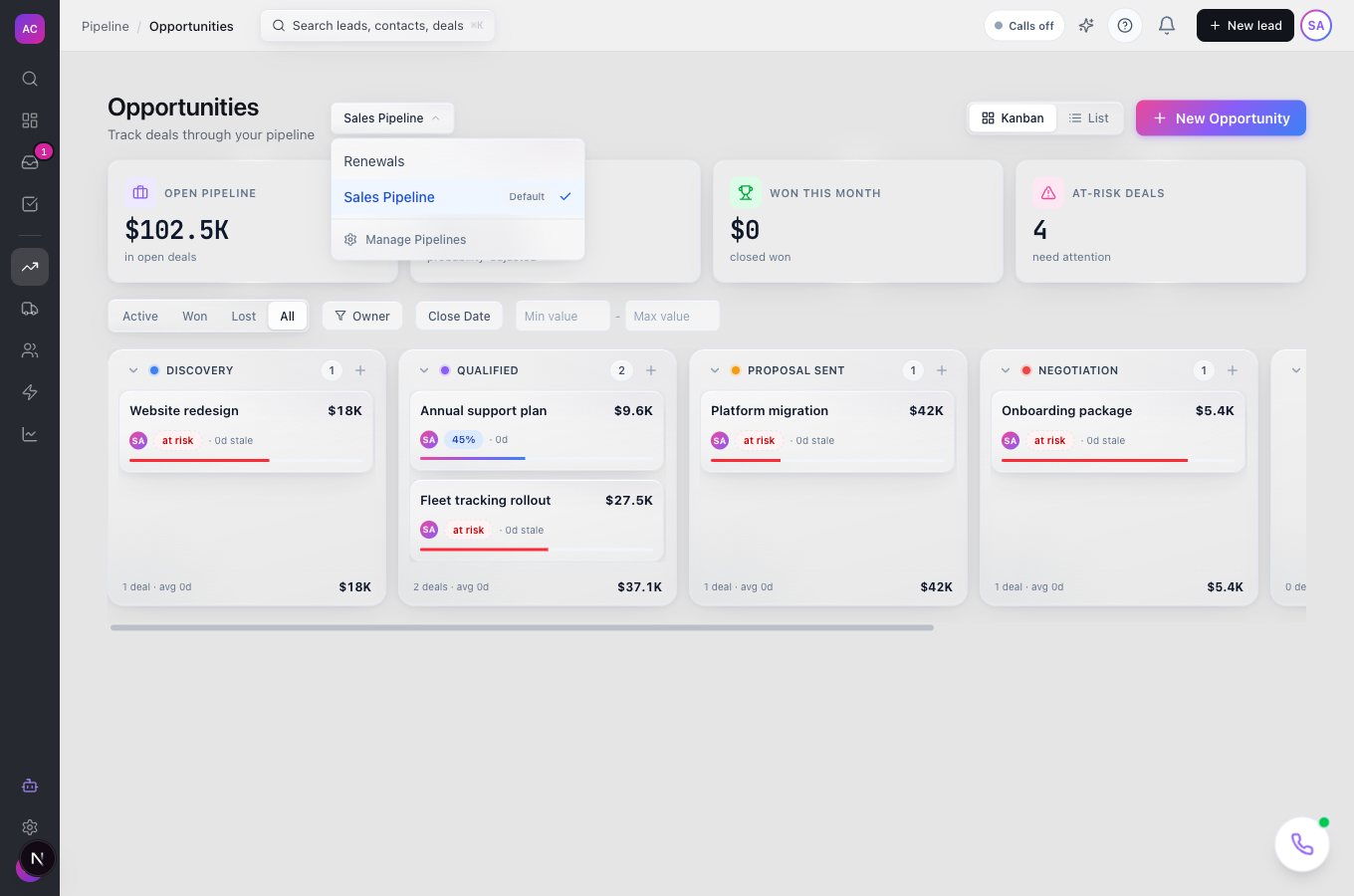
Create a deal in the right pipeline. When Raj Malhotra creates the Summit Logistics renewal, he picks Renewals under Pipeline in the new-opportunity dialog, then a stage.
Retire a pipeline. Close or move out every deal first, then open the pipeline in Settings → Pipelines and click Delete. You cannot delete the default pipeline or your only pipeline.
Rules and limits
Section titled “Rules and limits”| Rule | Value |
|---|---|
| Plans for more than one pipeline | Essentials, Growth, Scale |
| Pipeline name length | 1 to 200 characters |
| Stages in a new pipeline | Discovery, Qualified, Proposal Sent, Negotiation, Won, Lost |
| Default pipeline | exactly one; the first pipeline is the default |
| Deleting a pipeline | refused while any opportunity is linked to it, for the default pipeline, and for the only pipeline |
| Who can add, rename or set the default | roles with the Settings Edit permission |
| Who can delete a pipeline | roles with the Settings Edit and Delete permissions |
| Who can see pipelines | anyone who can view leads |
Troubleshooting and FAQ
Section titled “Troubleshooting and FAQ”My stage changes disappeared after reloading. Stage changes are not saved yet. Each pipeline keeps the stages it already has.
“Cannot delete pipeline: N opportunities are linked to this pipeline”. Deals still live in it, including won and lost ones. Delete those opportunities first, or keep the pipeline.
I cannot see the Delete button. The pipeline is the default, or it is your only pipeline. Set another pipeline as default first.
The + button is greyed out. Your plan includes one pipeline. Upgrade to Essentials or above under Settings → Plan & Billing.
Can I move a deal to another pipeline? Not yet. Create a new opportunity in the other pipeline and close the old one as lost.