GDPR tooling
In short. GDPR tooling helps you handle personal-data requests: log an erasure request on a lead, collect consent on web forms, and set retention rules per jurisdiction. Verification and final deletion are still manual.
Who it is for. Admins and workspace owners who answer data-subject requests for EU and UK contacts.
- Where it lives
- Opens from a record or another screen
- Plans
- SoloEssentialsGrowthScale
- Permission
- GDPR
What it does
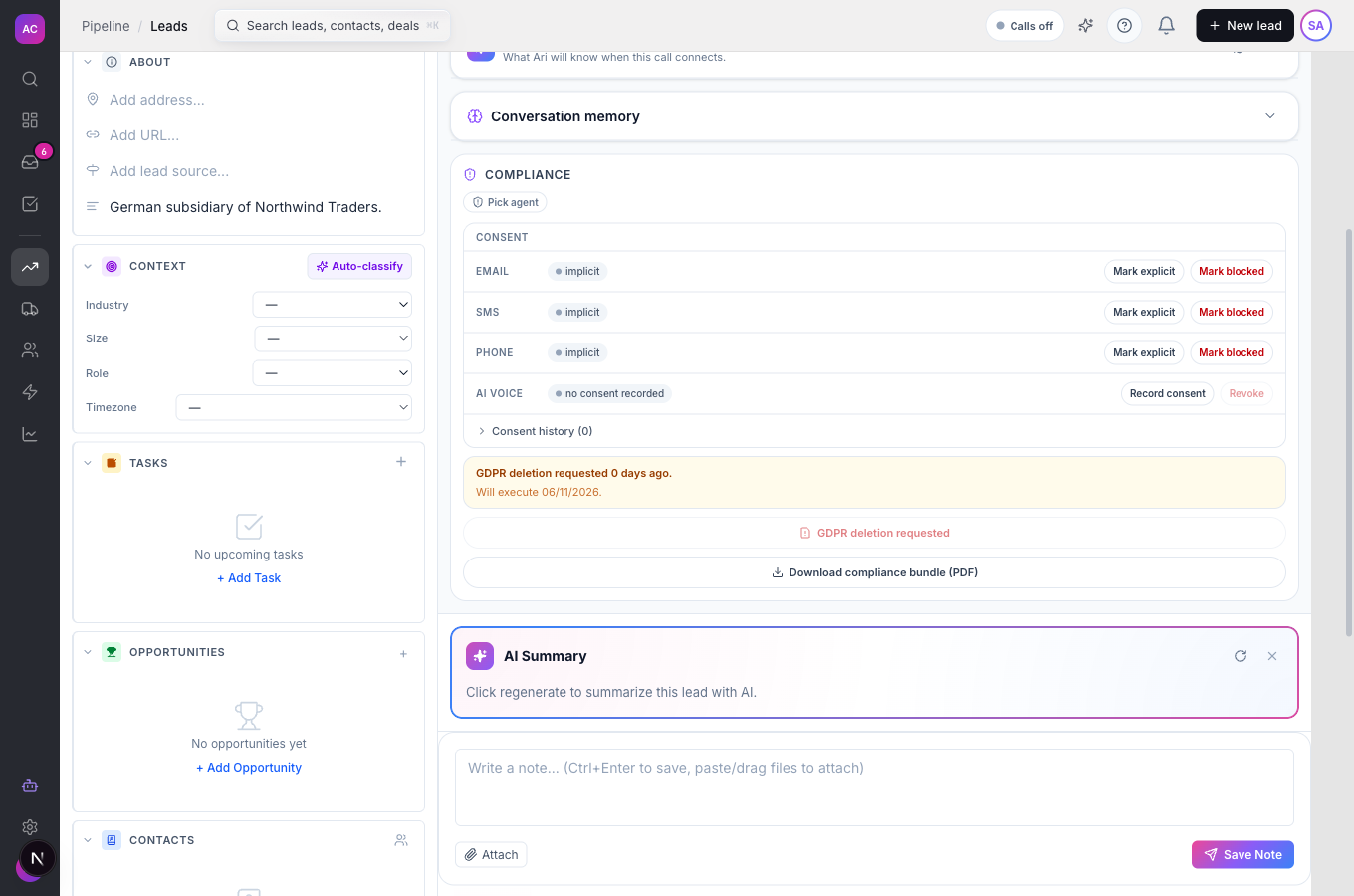
Section titled “What it does”- Records a right-to-erasure request on a lead with Request GDPR deletion, stores the requester’s email and the date, and shows “GDPR deletion requested N days ago” on the lead from then on.
- Counts open deletion requests on the Compliance overview and shows a red banner while any are waiting.
- Adds a GDPR Consent checkbox to your web forms with your own Consent text and a Privacy policy URL. When someone ticks it, the submission keeps the acceptance, the time and the sender’s network address. If you mark the field required, the form cannot be sent without it.
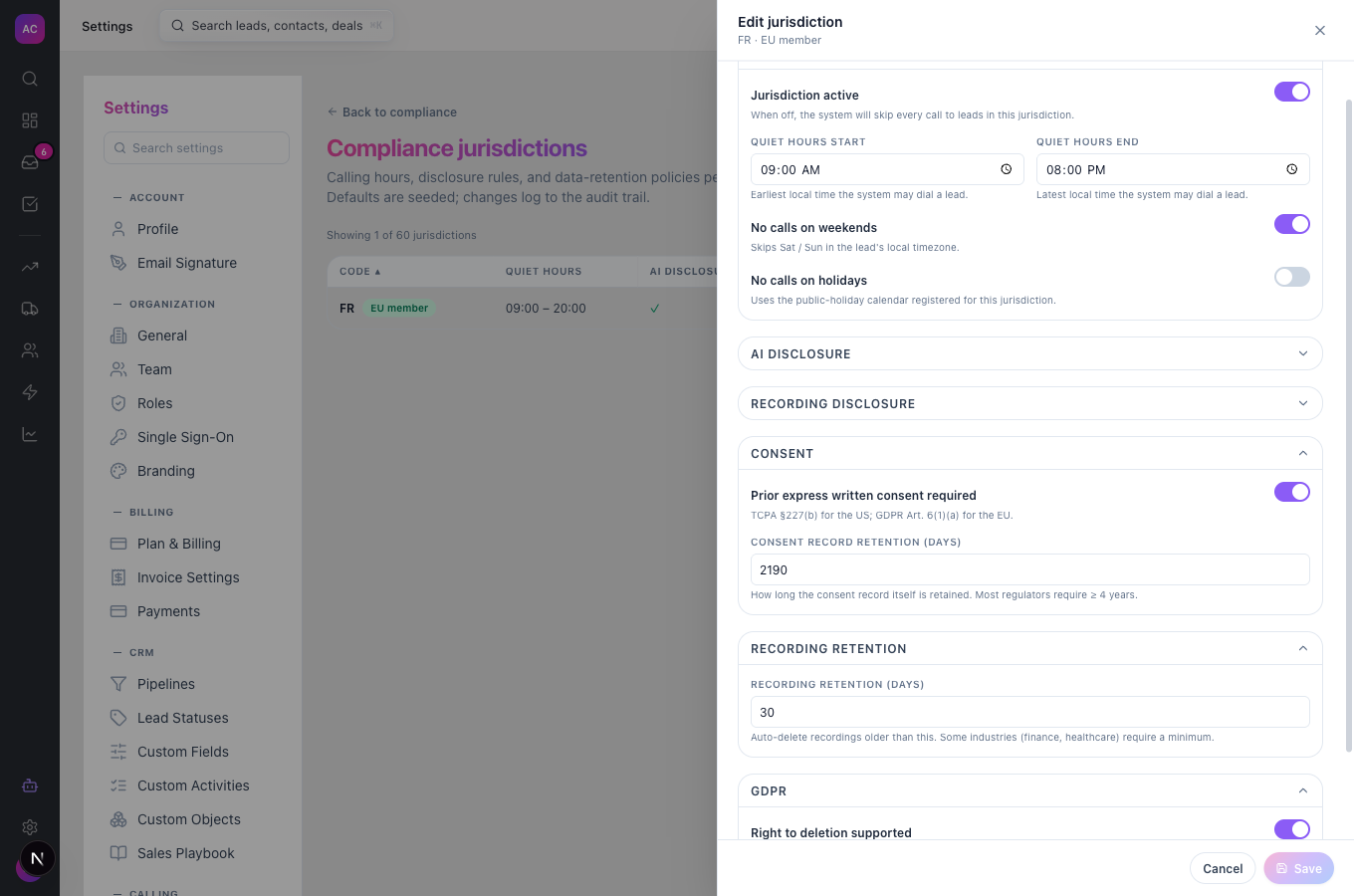
- Lets you set Consent record retention (days), Recording retention (days) and Right to deletion supported per jurisdiction under Compliance jurisdictions. Recordings past their retention period are deleted automatically.
- Gives you the compliance bundle PDF for a lead (consent records, compliance events and call audits) when you need to show what you hold. See Compliance controls.
What it does not do
Section titled “What it does not do”- It does not send a verification email yet, although the dialog mentions one. The request is recorded as soon as you submit it, so verify the requester’s identity yourself first.
- It does not delete the lead automatically after 30 days yet. The date on the lead shows when deletion is due. Delete the lead yourself when the request is valid; see Leads.
- It does not have an export button for a data-access or portability request. There is no in-app export of everything held about one person yet.
- It does not list all GDPR requests in one place, and you cannot cancel a request from the app.
- It does not turn a ticked form checkbox into a consent record on the lead. Record consent on the lead as described in Compliance controls.
Set it up
Section titled “Set it up”- Open Settings → Forms, open your form and add a GDPR Consent field. Fill in Consent text, for example “I agree to Acme Sales Co.’s privacy policy”, and the Privacy policy URL. Mark it required if consent is a condition of contact.
- Open Settings → Call Compliance → Manage jurisdictions. For each EU or UK jurisdiction you work in, open it, check Right to deletion supported, and set Consent record retention (days) and Recording retention (days) to match your policy. Click Save.
- Make sure the people who handle requests have the Compliance “Submit” permission, which shows the Request GDPR deletion button. Ask an admin to adjust the role under Settings → Roles.
Works the same on mobile.
Use it day to day
Section titled “Use it day to day”Log an erasure request. Northwind Traders’ contact emails Nina Alvarez asking to be forgotten. Nina checks that the email comes from the address on file, then:
- Opens the lead Northwind Traders and scrolls to the Compliance panel above the timeline.
- Clicks Request GDPR deletion, enters the requester’s address in Requester email and clicks Send verification email.
- Sees the button change to GDPR deletion requested and a note saying when deletion is due.
Finish the request. Before the due date, an admin downloads the compliance bundle if the record of consent must be kept as proof, then deletes the lead and its contacts. Reply to the requester to confirm.
Keep an eye on open requests. The Compliance overview shows “N GDPR deletion requests awaiting processing.” while any request is open.
Rules and limits
Section titled “Rules and limits”| Rule | Value |
|---|---|
| Plans | Growth and Scale |
| Cooling-off shown on the lead | 30 days from the request |
| Requests per lead | one; asking again does nothing |
| Requester email | a valid address, up to 320 characters |
| Retention settings | 1 to 36,500 days per jurisdiction |
| Who can request | the Compliance “Submit” permission to see the button and “Edit” for the request to go through |
Troubleshooting and FAQ
Section titled “Troubleshooting and FAQ”I do not see Request GDPR deletion. Your role needs the Compliance “Submit” permission. If the button shows but the request fails, the role also needs Compliance “Edit”.
The button says “GDPR deletion requested” and is greyed out. A request is already logged for this lead. There is one request per lead.
The requester says they never got a verification email. None is sent yet. Confirm their identity by replying from your own mailbox.
The due date passed and the lead is still there. Automatic deletion is not available yet. Delete the lead yourself.
Does the GDPR permission in Roles control any of this? Not yet. The buttons follow the Compliance permissions.
Where is the consent someone gave on my form? On the form submission, with the time and network address. It is not added to the lead’s Consent card.