AI daily briefings
In short. Every morning each rep gets a short AI stand-up: what changed, who needs attention, what to do first. It shows on the dashboard and as a notification. Scale adds premium AI for Deal Coach.
Who it is for. Reps who want a plan for the day before they open their inbox, and managers on Scale who want the deepest coaching on key deals.
- Where it lives
- Opens from a record or another screen
- Plans
- SoloEssentialsGrowthScale
- Permission
- No special permission needed
What it does
Section titled “What it does”- Writes a daily briefing for each rep once a day and delivers it at 8:00 in the rep’s own time zone as an in-app notification.
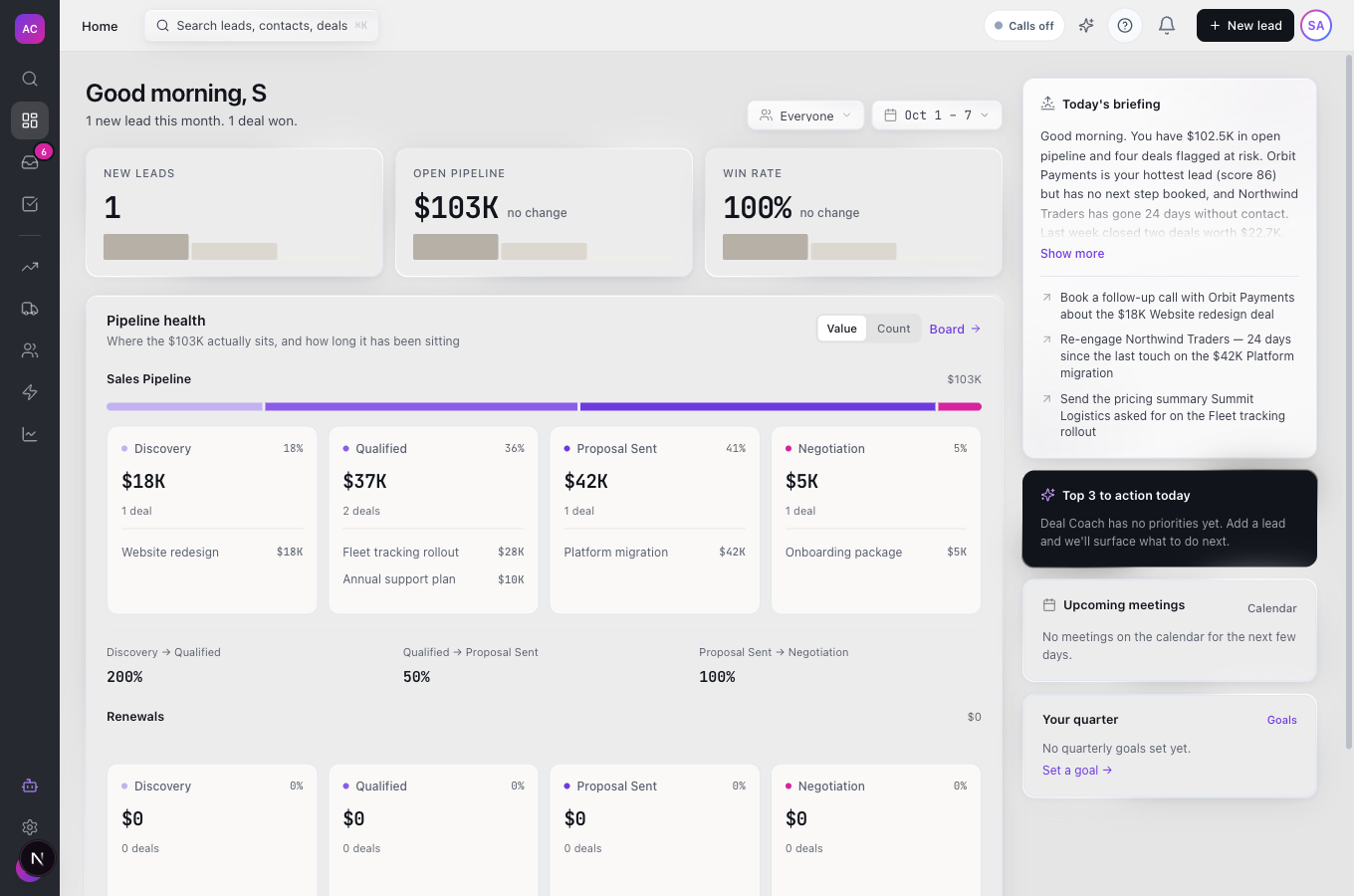
- Shows the same briefing on the dashboard in the Today’s briefing card and in the Copilot panel, so you read one text wherever you open it. Long briefings fold behind Show more.
- Sends a copy by email to reps who switch on Email me my daily briefing.
- On Scale, lets the Refresh button in the Deal Coach panel recompute a lead’s advice with premium AI, for a more careful read of a deal that matters.
- Includes the Pre-call briefing card on the lead page: the lead profile, conversation history and call intent an AI voice agent would use, with a Goal of this call picker. See AI voice agents.
What it does not do
Section titled “What it does not do”- It does not brief people who have not signed in for 14 days, deactivated users, or AI Team agent accounts.
- It does not let you choose the delivery time. It arrives at 8:00 local time.
- It does not need Scale for the daily briefing itself. The daily briefing comes with Deal Coach and Copilot on Essentials, Growth and Scale; Scale adds premium AI.
- It does not show the Pre-call briefing card to every role yet. Today only the workspace’s main administrator account sees it.
- It does not regenerate the daily briefing during the day. It is written once each morning.
Set it up
Section titled “Set it up”- Make sure your time zone is right under Settings → Profile; the briefing arrives at 8:00 in that zone.
- On the same page, under Daily briefing, switch on Email me my daily briefing if you want it in your inbox too. The notification arrives either way.
- Sign in at least once every two weeks to keep receiving it.
Works the same on mobile.
Use it day to day
Section titled “Use it day to day”Start the day. Nina Alvarez opens Dashboard. Today’s briefing says Helios Energy replied overnight and Summit Logistics’ proposal expires Friday, and lists what to do first. She works down the list.
Act from the briefing. Some suggested actions can be approved straight from the card or the Copilot panel. The result replaces the button in place.
Go deeper on one deal (Scale). On a lead that matters, for example Meridian Health, click Refresh in the Deal Coach panel. The coach recomputes with premium AI and the panel updates when it is ready.
Rules and limits
Section titled “Rules and limits”| Rule | Value |
|---|---|
| Daily briefing | Essentials, Growth and Scale (comes with Deal Coach and Copilot) |
| Premium AI refresh | Scale only |
| Delivery time | 8:00 in each rep’s time zone |
| Briefings per rep | one per local day |
| Who gets it | active users who signed in within the last 14 days |
| Email copy | off by default; each rep opts in |
| AI usage | counts toward the workspace’s AI token limit; if the limit is reached, that day’s briefing is skipped |
Troubleshooting and FAQ
Section titled “Troubleshooting and FAQ”I did not get a briefing this morning. Check that you signed in within the last 14 days and that your time zone is set. If your workspace reached its AI token limit, briefings are skipped for the day.
The briefing came at the wrong time. It follows the time zone on your profile. Correct it under Settings → Profile.
Refresh on the Deal Coach panel does nothing. Refresh with premium AI is part of the Scale plan. On other plans, the coach still updates on its own when the lead changes.
I cannot see the Pre-call briefing card. It is visible only to the workspace’s main administrator account for now.